Smokeball vs Clio:
A complete comparison guide
How does Smokeball compare to Clio?
This guide will help you understand the key differences between Smokeball and Clio, and to help you select the best legal software for your law firm.
Smokeball has a higher rating than Clio across independent review sites such as G2, Capterra, and Software Advice.

According to G2, Smokeball outranks Clio across all of it’s ratings including ease of use, quality of support, ease of admin, and more


Meets requirements
Ease of use
Ease of setup
Ease of admin
Quality of support
Has the product been a good partner in doing business?
Product direction (% positive)
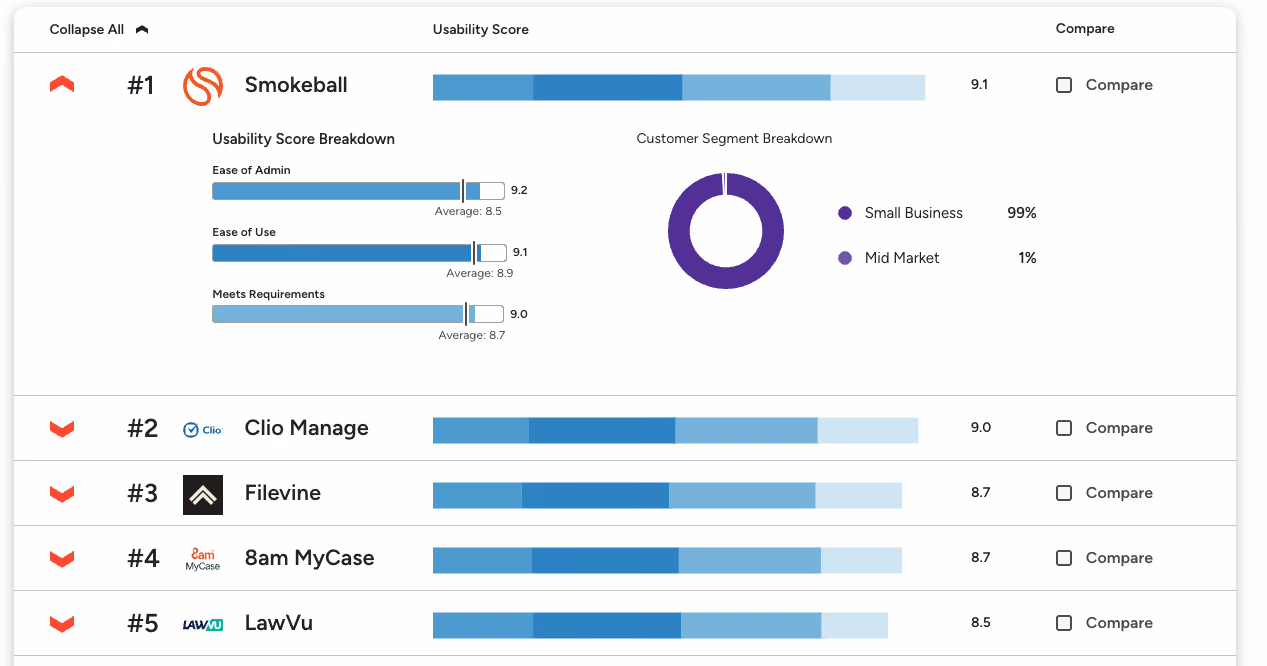
For Legal Document Management Software, G2 ranks Smokeball as the #1 easiest to use
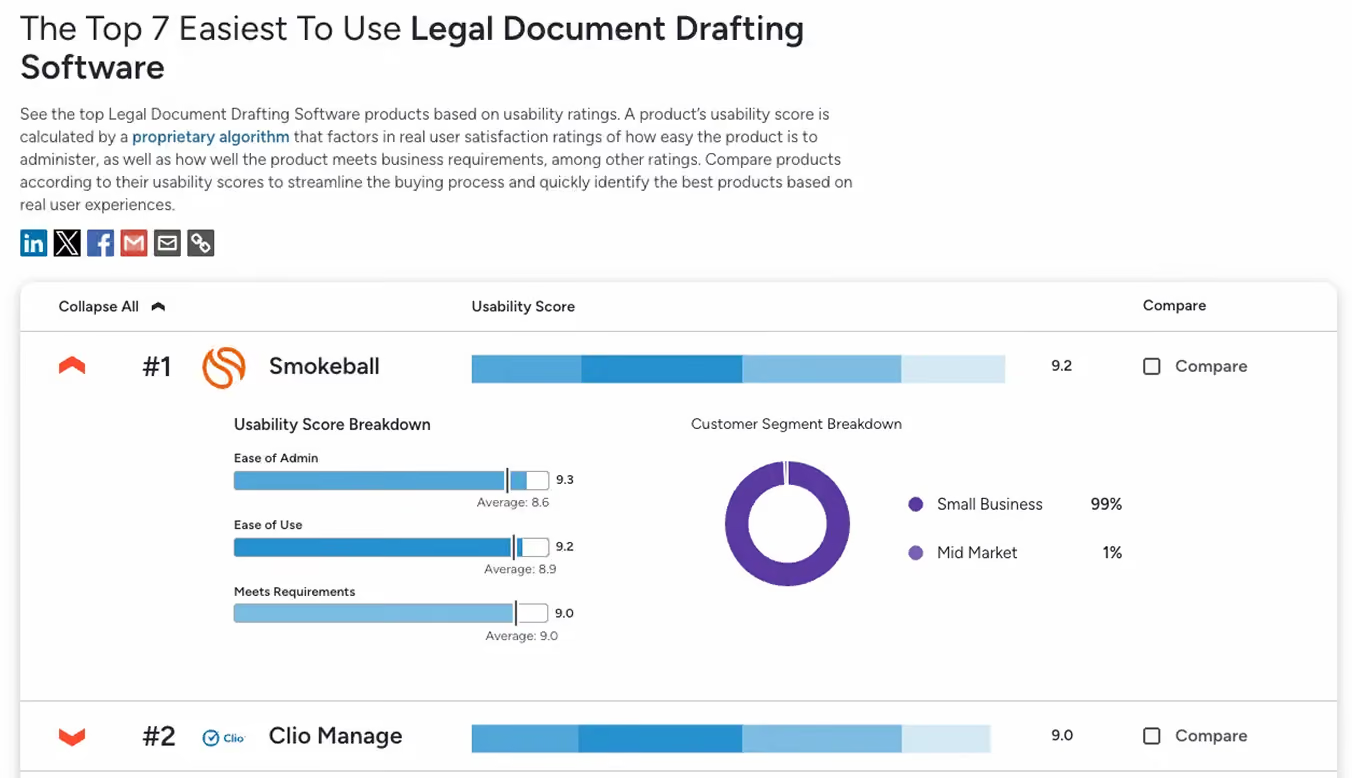
Smokeball is also the #1 easiest to use in the Legal Document Drafting Software category
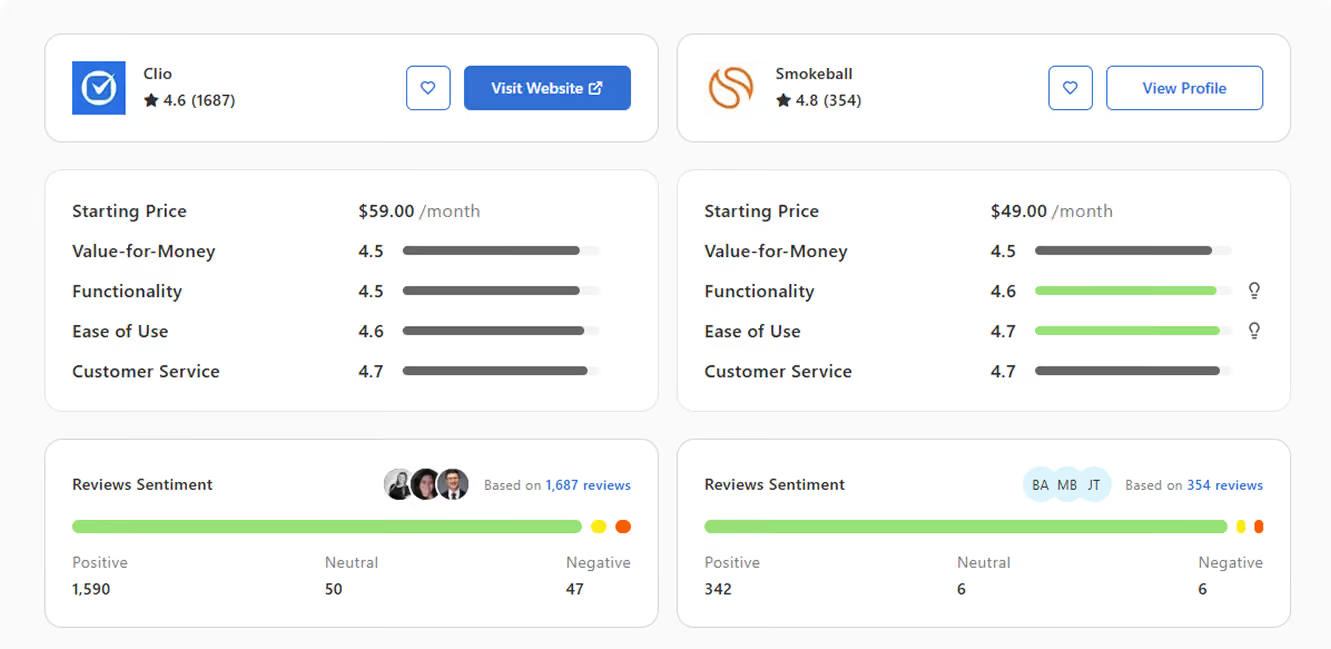
Capterra also ranks Smokeball higher at 4.8 compared to Clio 4.6, with Smokeball’s functionality, customer service, and ease of use beating Clio
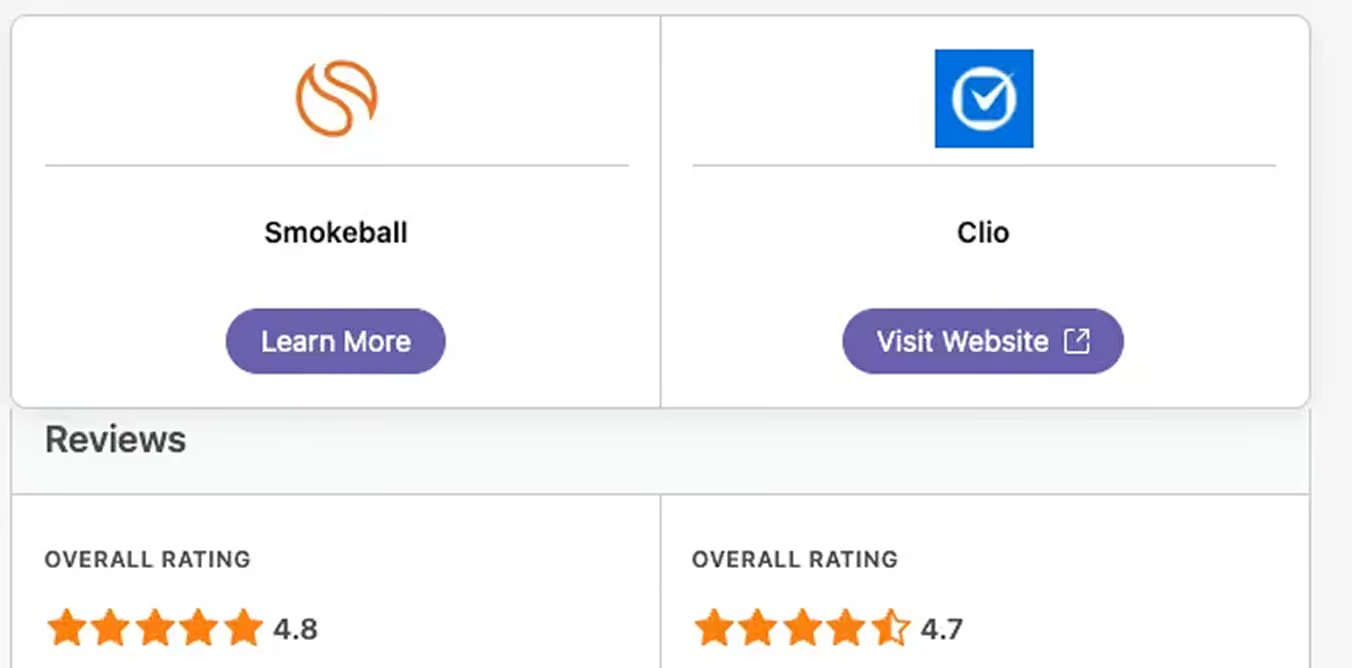
It’s also a similar story with Software Advice, with Smokeball having a higher rating of 4.8 stars out of 5
“With Smokeball, you’re picking up more of your billing, and you’re spending less time on the coordination. It’s a double win.”
Smokeball vs Clio: Features Comparison
Automatic time tracking
Automatically tracks all activities (AutoTIme). Firms using Smokeball bill twice as much as industry averages.
Manual time tracking or expensive third-party add-ons required.
Pre-configured legal templates
Comes with built-in templates and forms tailored to practice areas and state laws.
Requires extensive manual setup and customization.
Document automation and storage
Full automation to create, save, and store documents directly within Smokeball- no additional tools needed.
Requires 2+ add-ons for automation and storage, increasing complexity and costs.
Integrations
Supports integrations with all your favourite apps (e.g. Microsoft 365, Dropbox, Google Drive) but doesn’t require them for core functionality.
Relies heavily on integrations for essential features like time tracking and document management.
Support & vendor simplicity
One system, one vendor, one support line- fewer headaches.
Multi third-party tools require separate support calls and troubleshooting.
Pricing model
Transparent pricing with all core features included; our plans grow with your firm.
Lower entry price but frequent upsells and hidden costs for essential features.
Data insights & reporting
Accurate reports powered by automatic time tracking, providing deeper insights.
Limited reports, often inaccurate due to manual data entry and time tracking.
What sets Smokeball apart
If you’re researching Clio alternatives, Smokeball should be at the top of your list for several reasons including:
- All-in-one functionality
- Robust security
- An intuitive and easy to use platform
- Automatic time tracking
True all-in-one legal practice management
Smokeball supports the entire client lifecycle in one platform, from intake and matter management through to billing and payment. There’s no need to stitch together add ons or extra software. Everything works together out of the box, exactly how a law firm needs it to.
Enterprise grade security
Law firms have a strict obligation to protect client data. Smokeball meets this responsibility with robust security standards, including ISO 27001 certification, so you can be confident your data is protected at every stage.
Built for ease of use
Smokeball is designed specifically for legal professionals, which means it’s intuitive, logical, and easy to navigate. Your team can get up and running quickly without spending hours learning a complex system or fighting clunky workflows.
Automatic time tracking that works in the background
Smokeball is the only legal practice management software with built in automatic time tracking through AutoTime.
It captures billable work as you go, so nothing is missed and you can spend more time on client facing work instead of reconstructing timesheets.
Local expert support and training
Switching legal software comes with a learning curve. Smokeball supports firms with responsive, expert training and support from teams based in the US, so help is always available when you need it.
Seamless integrations
Smokeball's seamless integrations allows you to connect with your existing tools and applications.
“With Smokeball, you’re picking up more of your billing, and you’re spending less time on the coordination. It’s a double win.”
See why smart law firms pick Smokeball over Clio
Our local team will show you exactly how much time your firm could get back. 30 minutes. No pressure. No commitment.
FAQs
Everything you want to know before taking the next step.
What are the main differences between Clio and Smokeball?
Smokeball is an all-in-one legal practice management solution that includes document management, AI tools, automatic time tracking, and robust billing. In contrast, Clio often requires third-party add-ons or upgraded plans to access similar functionality. Smokeball also offers faster setup, easier onboarding, and award winning US based support.
Why do lawyers switch from Clio to Smokeball?
Lawyers often switch from Clio to Smokeball to reduce manual work and simplify daily operations. Smokeball automatically tracks time, emails, and document activity, which can help firms capture more billable work without changing habits.
Many law firms find Clio’s reliance on third-party integrations, add-ons, and manual data syncing inefficient and cumbersome. Smokeball, by contrast, consolidates legal workflows into a single platform, reduces profit leakage, and simplifies billing and payments.
Which legal practice management software is the best for solo and small firms?
Smokeball has a host of advanced but easy to use features such as document automation, automatic time tracking, form population, email filing, trust accounting, and court rules built directly into the platform. These tools are designed specifically for law firms and work together out of the box.
Clio, on the other hand, requires additional integrations and add-ons to match Smokeball in terms of features, which results in more costs and issues.
How does Clio compare to Smokeball in terms of user experience?
Compared to Clio, Smokeball has been report as more intuitive, streamlined, and easier to use. Smokeball is designed for lawyers by lawyers, with smart automation running in the background to reduce clicks and data entry.
While Clio’s interface is modern and clean, the complex setup and onboarding results in hours managing and implementing integrations and manual customization.
What’s better for built in accounting: Smokeball or Clio with QuickBooks?
When it comes tolegal-specific accounting, Smokeball is the clear winner. Smokeball includesthree-way reconciliation,automated transactions creation, and detailed fiduciary accounting reports.
Clio does not include full accounting on its own and typically requires QuickBooks Online for general ledger accounting. This means managing two systems and keeping data in sync. If you want fewer systems and simpler accounting workflows, Smokeball is often the better choice.
Is Smokeball or Clio better for a solo practice just getting started?
For solo attorneys, Clio can be appealing as a lightweight entry point into practice management. However, many solos choose Smokeball because it provides more built in functionality from day one, reducing the need to piece together multiple tools as the practice grows.
Smokeball includes case management, document automation, billing, trust accounting, and email management in one system. Its automatic time and activity tracking helps solo lawyers capture more billable work without extra effort.
If you want structure, automation, and fewer systems to manage as a new solo, Smokeball is often the stronger long term choice.
Is Smokeball or Clio better for a small law firm?
Small law firms often outgrow Clio’s core features as workloads increase and processes become more complex. Managing integrations for documents, workflows, and accounting can add overhead as teams expand.
Smokeball is designed to support small firms with built in automation, standardized workflows, and firm wide visibility. Features like automatic time tracking, document generation, and shared matter data help small teams stay consistent and efficient.
If your small firm values efficiency and wants tools that scale without added complexity, Smokeball may be the better fit.
Is Smokeball or Clio better for a medium size law firm?
For medium size firms, Clio typically requires multiple integrations and higher tier plans to support advanced workflows, reporting, and firm wide automation.
Smokeball is built to handle growing teams with centralized matter management, automation across documents and billing, and detailed insight into firm activity. Its design supports consistency across staff while reducing manual work as volume increases.
If your firm needs scalable automation and built in legal specific tools to support growth, Smokeball is often the more robust solution.
How easy is switching to Smokeball and migrating my data from Clio?
Switching from Clio to Smokeball is designed to be straightforward. Smokeball provides guided onboarding and migration support to help firms move contacts, matters, and historical data.
Several law firms have successfully switched from Clio to Smokeball, including DumasNeel Savage Legal Group, and Brinkley Law Firm.