Smokeball vs MyCase:
A complete comparison guide
How does Smokeball compare to MyCase?
This guide will help you understand the key differences between Smokeball and MyCase, and to help you select the best legal software for your law firm.
Smokeball has a higher rating than MyCase across independent review sites such as G2, Capterra, and Software Advice.

According to G2, Smokeball has a higher overall rating of 4.7 compared to MyCase’s 4.4
Smokeball also outranks MyCase across all of it’s ratings including ease of use, quality of support, ease of admin, and more


Meets requirements
Ease of use
Ease of setup
Ease of admin
Quality of support
Has the product been a good partner in doing business?
Product direction (% positive)
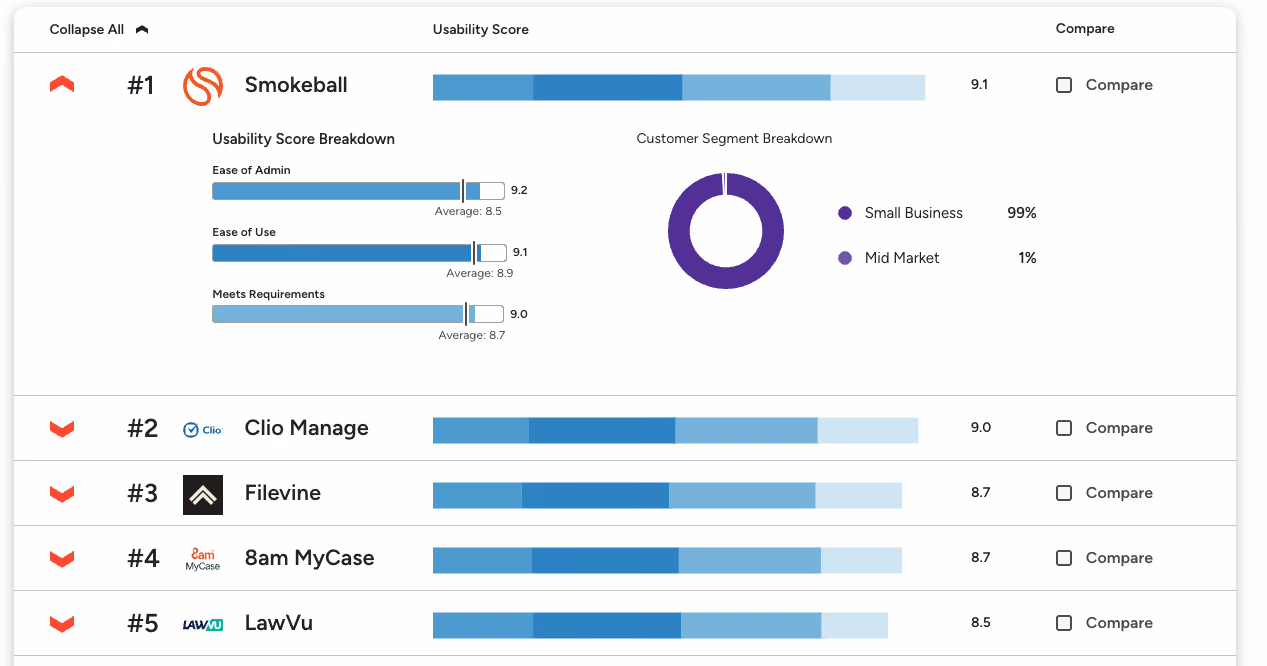
For Legal Document Management Software, G2 ranks Smokeball as the #1 easiest to use
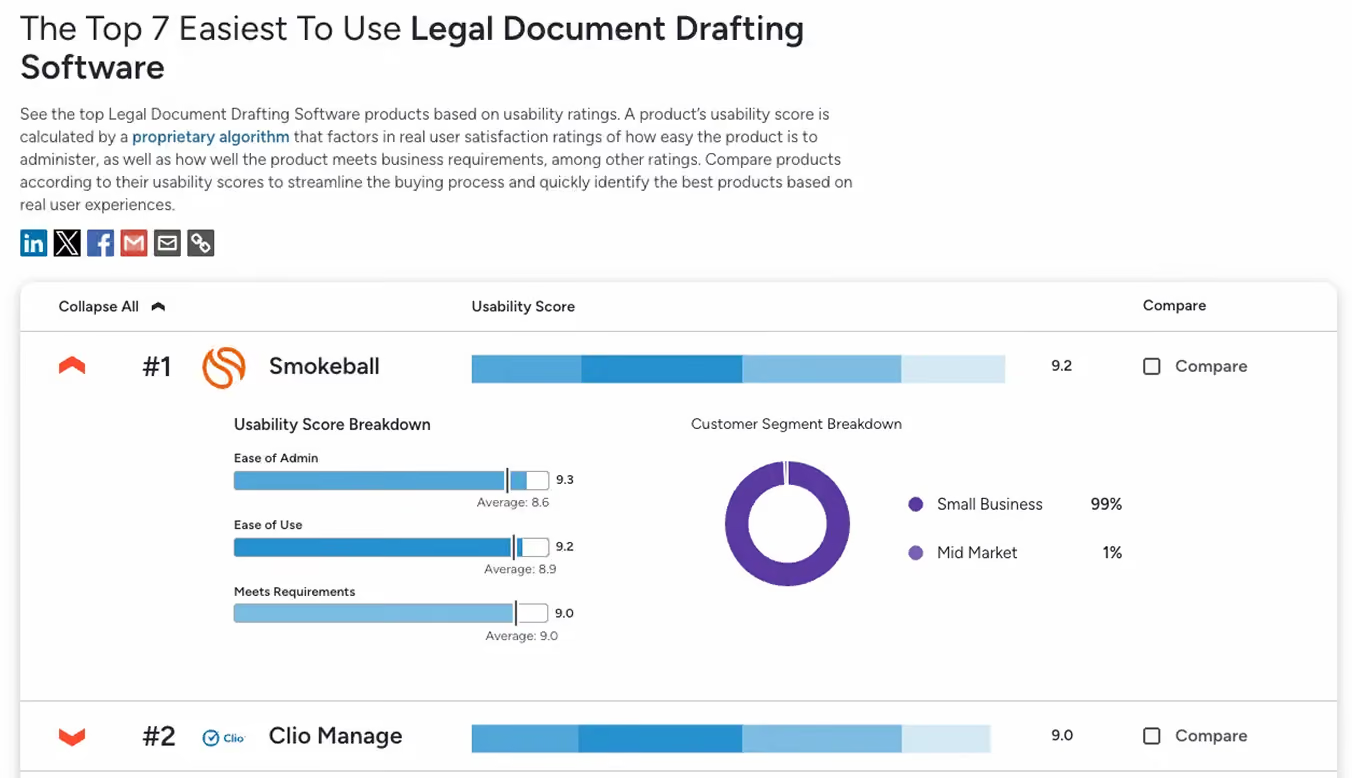
Smokeball is also the #1 easiest to use in the Legal Document Drafting Software category
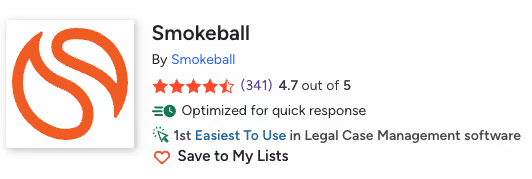
G2 also ranks Smokeball as the #1 easiest to use in the Legal Case Management Software category
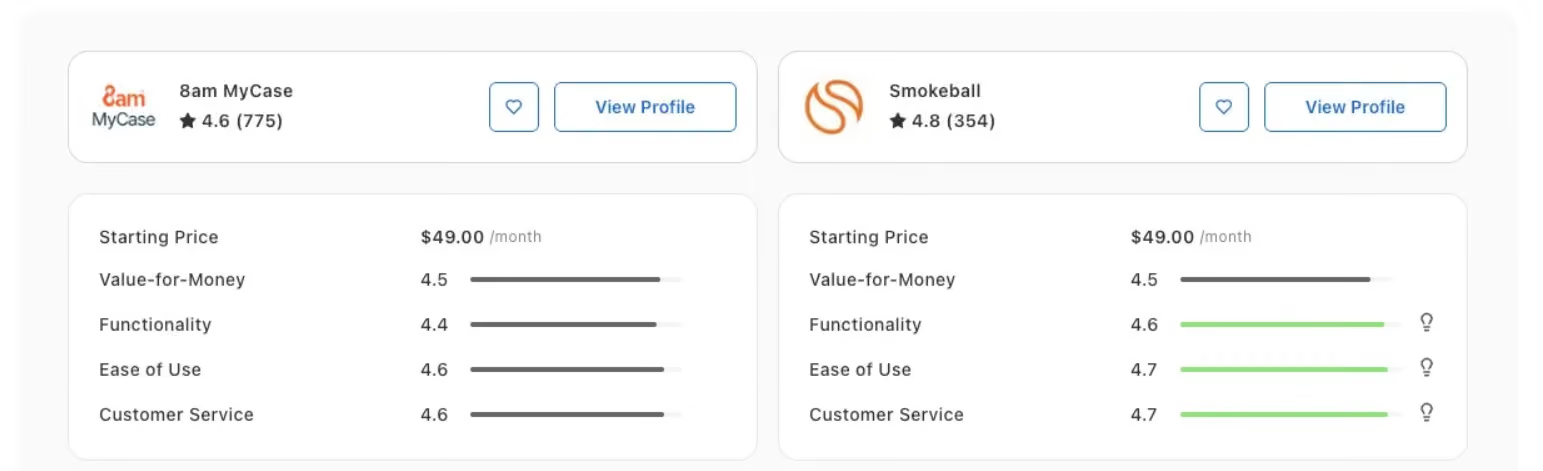
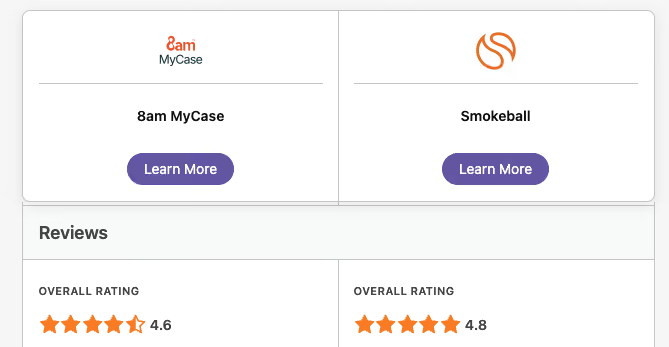
Capterra also ranks Smokeball higher at 4.8 compared to MyCase 4.6, with Smokeball’s functionality, customer service, and ease of use beating MyCase
“With Smokeball, you’re picking up more of your billing, and you’re spending less time on the coordination. It’s a double win.”
It’s also a similar story with Software Advice, with Smokeball having a higher rating of 4.8 stars out of 5
Smokeball vs MyCase: Features comparison
Passive Time Capture (Autotime):
Automatically records every minute of activity in the background across Word, Outlook, and the platform without requiring timers or manual starts.
Reactive Manual Tracking:
Relies on users to start/stop timers or use a retrospective "Smart Time Finder" that still requires manual entry and review of past activities.
20,000+ Jurisdictional Form Library:
Pre-built and maintained library of logic-driven forms for over 250 matter types, reducing the need for manual template creation.
Manual Template Maintenance:
Does not offer a native jurisdictional library; firms must build and maintain their own templates, leading to significant administrative overhead.
Practice-Area Specificity:
Over 250 pre-configured matter types with turnkey workflows and data fields tailored to specific areas of law (e.g., Estate Planning, Family Law).
Generic System Framework:
Provides a generalized structure that requires extensive manual customization to fit the needs of specialized legal practices.
Deep Microsoft Ecosystem Integration:
Native, two-way sync with Word and Outlook, allowing for seamless document editing and automatic email filing.
Fragmented Integration:
Web-based model often requires a "download-edit-reupload" cycle for documents and offers less robust, browser-dependent email syncing.
Advanced Productivity Analytics:
Business Intelligence (BI) dashboards that provide deep insights into staff labor costs, matter profitability, and firm growth trends.
Basic Operational Reporting:
Offers standard billing and financial reports but lacks the granular productivity and profitability analytics provided by Smokeball's BI suite.
What sets Smokeball apart
If you’re researching MyCase alternatives, Smokeball should be at the top of your list for several reasons including:
- All-in-one functionality
- Robust security
- An intuitive and easy to use platform
- Automatic time tracking
- Award winning US based support and training
True all-in-one legal practice management
Smokeball supports the entire client lifecycle in one platform, from intake and matter management through to billing and payment. There’s no need to stitch together add ons or extra software. Everything works together out of the box, exactly how a law firm needs it to.
Enterprise grade security
Law firms have a strict obligation to protect client data. Smokeball meets this responsibility with robust security standards, including ISO 27001 certification, so you can be confident your data is protected at every stage.
Built for ease of use
Smokeball is designed specifically for legal professionals, which means it’s intuitive, logical, and easy to navigate. Your team can get up and running quickly without spending hours learning a complex system or fighting clunky workflows.
Automatic time tracking that works in the background
Smokeball is the only legal practice management software with built in automatic time tracking through AutoTime.
It captures billable work as you go, so nothing is missed and you can spend more time on client facing work instead of reconstructing timesheets.
Local expert support and training
Switching legal software comes with a learning curve. Smokeball supports firms with responsive, expert training and support from teams based in the US, so help is always available when you need it.
Seamless integrations
Smokeball's seamless integrations allows you to connect with your existing tools and applications.
See why smart law firms pick Smokeball over others
Our local team will show you exactly how much time your firm could get back. 30 minutes. No pressure. No commitment.
FAQs
Everything you want to know before taking the next step.
What are the main differences between MyCase and Smokeball?
MyCase and Smokeball are both legal practice management platforms, but they are built with different philosophies. MyCase focuses on basic case management features, while Smokeball is designed as an end-to-end productivity system with deep automation and built-in legal accounting.
The biggest difference is automation. Smokeball automatically tracks time and activity in the background, generates documents from matter data, and connects workflows across the firm. MyCase generally relies on more manual data entry and third-party tools to achieve similar outcomes. If reducing admin work and capturing every billable minute matters, Smokeball is the stronger choice.
Why do lawyers switch from MyCase to Smokeball?
Many lawyers switch because MyCase requires too much manual work as their firm grows. Time tracking, document creation, and billing often depend on user discipline, which can lead to missed revenue and inefficiency.
Smokeball appeals to firms that want automation built into daily work. Automatic time tracking and activity capture, document automation, and integrated billing help firms increase profitability without adding staff. If you are frustrated by manual processes or revenue leakage, Smokeball is often a clear upgrade.
How does MyCase compare to Smokeball in terms of features?
MyCase offers core features like case management, messaging, calendaring, and billing, with some functionality varying by plan. Many advanced workflows rely on integrations rather than native tools.
Smokeball includes advanced document automation, automatic time tracking, matter-based workflows, and built-in legal accounting in one platform. These features are tightly connected, which reduces errors and duplicated work. Firms that want a single, powerful system rather than a collection of tools typically prefer Smokeball.
How does MyCase compare to Smokeball in terms of user experience?
MyCase has a simple, browser-based interface that works well for basic tasks. However, many actions require multiple clicks and repeated data entry across features.
Smokeball is designed around how legal work actually happens. Matter data flows automatically into documents, billing, and trust accounting, and time is captured passively. The result is a more guided, efficient experience that saves time every day. If ease of use means less thinking about admin work, Smokeball stands out.
Is Smokeball or MyCase better for law firm financial management and built-in legal accounting?
Smokeball is significantly stronger for financial management. It includes built-in legal billing and trust accounting that is designed to meet law firm compliance needs, depending on jurisdiction and plan.
MyCase typically relies on integrations like QuickBooks for accounting, which can add complexity and reconciliation work. Firms that want tighter financial control, better compliance support, and fewer disconnected systems usually find Smokeball to be the better fit.
Is Smokeball or MyCase better for a solo practice just getting started?
MyCase can work for solos who want a basic setup and are okay with spending time handling admin tasks manually.
Smokeball is ideal for solos who want to build efficient habits from day one. Automatic time tracking, document automation, and built-in accounting help solo lawyers capture more revenue and spend more time practicing law. If you want to grow without burning out, Smokeball is the smarter long-term choice.
Is Smokeball or MyCase better for a small law firm?
For small firms, Smokeball is the better option. As multiple users collaborate, automation becomes critical to maintaining consistency, profitability, and visibility across matters.
MyCase can feel limiting as workloads increase, especially when firms need better reporting, document automation, and billing accuracy. Smokeball gives small firms enterprise-level efficiency without enterprise complexity.
Is Smokeball or MyCase better for a medium size law firm?
Smokeball is better suited for medium-sized firms that need scalable workflows, strong financial controls, and firm-wide consistency. Automation reduces reliance on staff memory and manual processes, which becomes essential as teams grow.
Medium size law firms often outgrow the capabilities of MyCase, particularly when firms require more advanced document generation, accounting, and productivity tracking. Medium firms focused on profitability and operational discipline typically choose Smokeball.
How easy is switching to Smokeball and migrating my data from MyCase?
Switching from MyCase to Smokeball is designed to be straightforward. Smokeball provides guided onboarding and migration support to help firms move contacts, matters, and historical data.
Several law firms have successfully switched from MyCase to Smokeball, including DumasNeel Savage Legal Group, and Brinkley Law Firm.
Firms moving from MyCase often find that the transition pays off quickly once automation is in place. If you want a smoother day-to-day practice and higher return on your software investment, the switch to Smokeball is well worth it.
Several law firms have successfully switched from MyCase to Smokeball, including Gort Law.