city
👋 Hello! It looks like you're visiting from the US. Do you want to visit our American site?
👋 Hello! It looks like you're visiting from the UK. Do you want to visit our UK site?
👋 Hello! It looks like you're visiting from Australia. Do you want to visit our Australian site?
×

Archie AI for Word: AI-Powered Legal Drafting, Embedded Directly in Microsoft Word

Discover Archie AI for Word, Smokeball's AI legal drafting assistant embedded directly in Microsoft Word. Draft legal documents faster with matter-aware AI, tracked edits, and secure access to GPT, Claude, and Gemini.

Smokeball Logo
Written by Smokeball
June 22, 2026
3 min read
Explore Smokeball
Get Pricing
Explore Smokeball
  • Bill accurately with AutoTime
  • Integrate with Word & Outlook
  • Access 20,000 - prebuilt legal forms
  • Grow with smart reports & insights
Get Pricing

Archie AI for Work: Native to your workflow. Grounded in your matter.

Lawyers spend a significant portion of their day drafting, reviewing, and refining documents in Microsoft Word. That's why Smokeball has brought Archie AI directly into the place where legal work happens.

Archie AI for Word just got more powerful — your AI legal drafting assistant, embedded natively inside Microsoft Word and powered by the full context of your matter.

Instead of switching between applications, copying and pasting content, or relying on generic AI tools that lack legal context, Archie AI works alongside you in Word, helping you draft, edit, analyze, and refine documents without interrupting your workflow.

Bringing Archie AI to your Word Workflow

Draft with the context that matters

Most AI drafting tools only see the text that's currently in front of them, but Archie AI goes further. Because Archie AI is connected to your Smokeball matter, it draws from relevant files, correspondence, evidence, events, notes, and tasks to inform its responses.

That means more accurate drafts and suggestions, and less time spent manually providing background information or documents.

Whether you're preparing correspondence, drafting court documents, or refining legal arguments, Archie AI embedded in Word helps ensure your work is grounded in the information that matters.
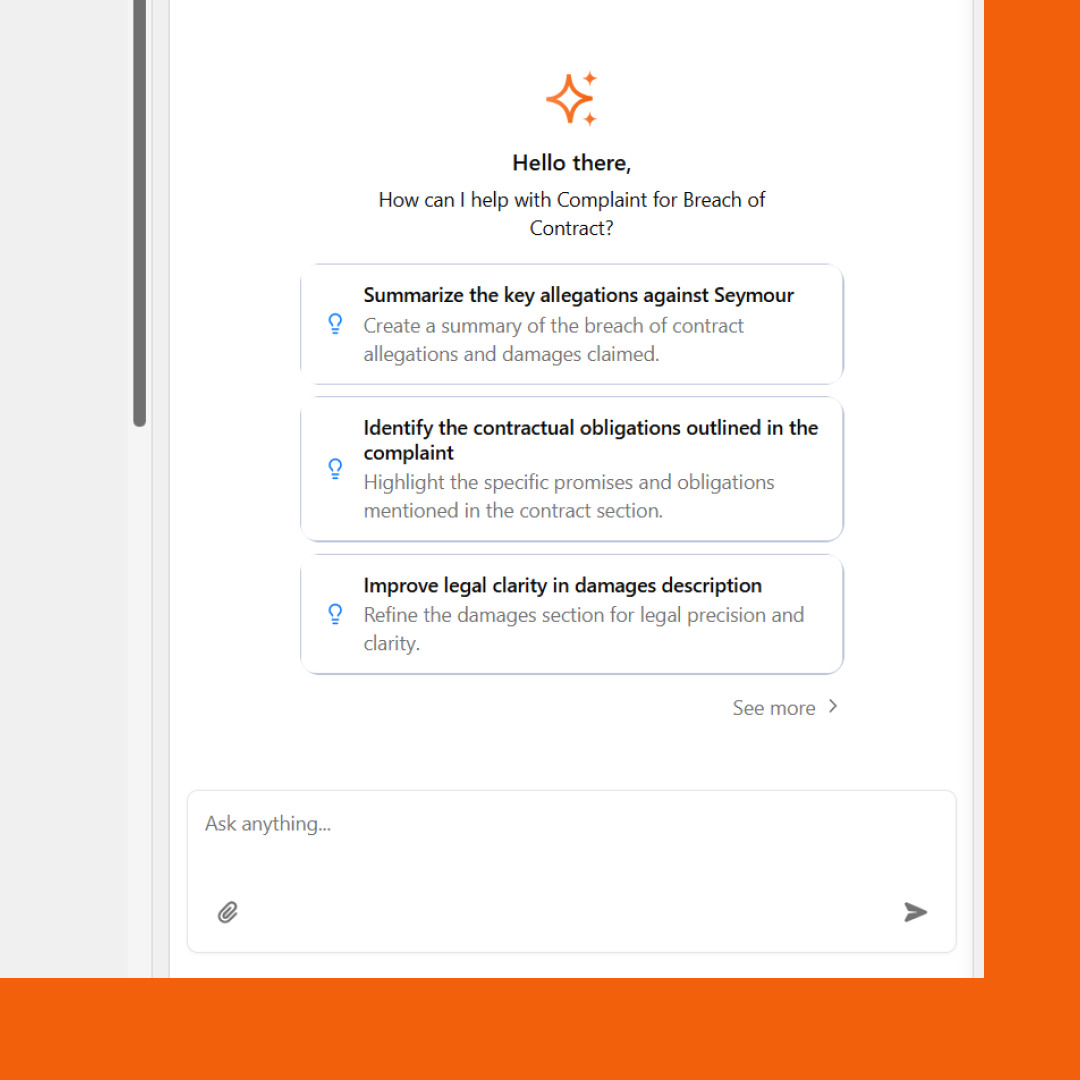
Archie AI is connected to your Smokeball matter

Stay focused and maintain drafting momentum

Switching between applications breaks concentration and slows progress. Archie AI for Word helps you stay in flow by keeping drafting assistance exactly where you need it.

Need to rewrite a paragraph? Summarize a lengthy section? Generate a first draft of a client letter? Ask Archie AI directly from the sidebar and continue working without disrupting your momentum.
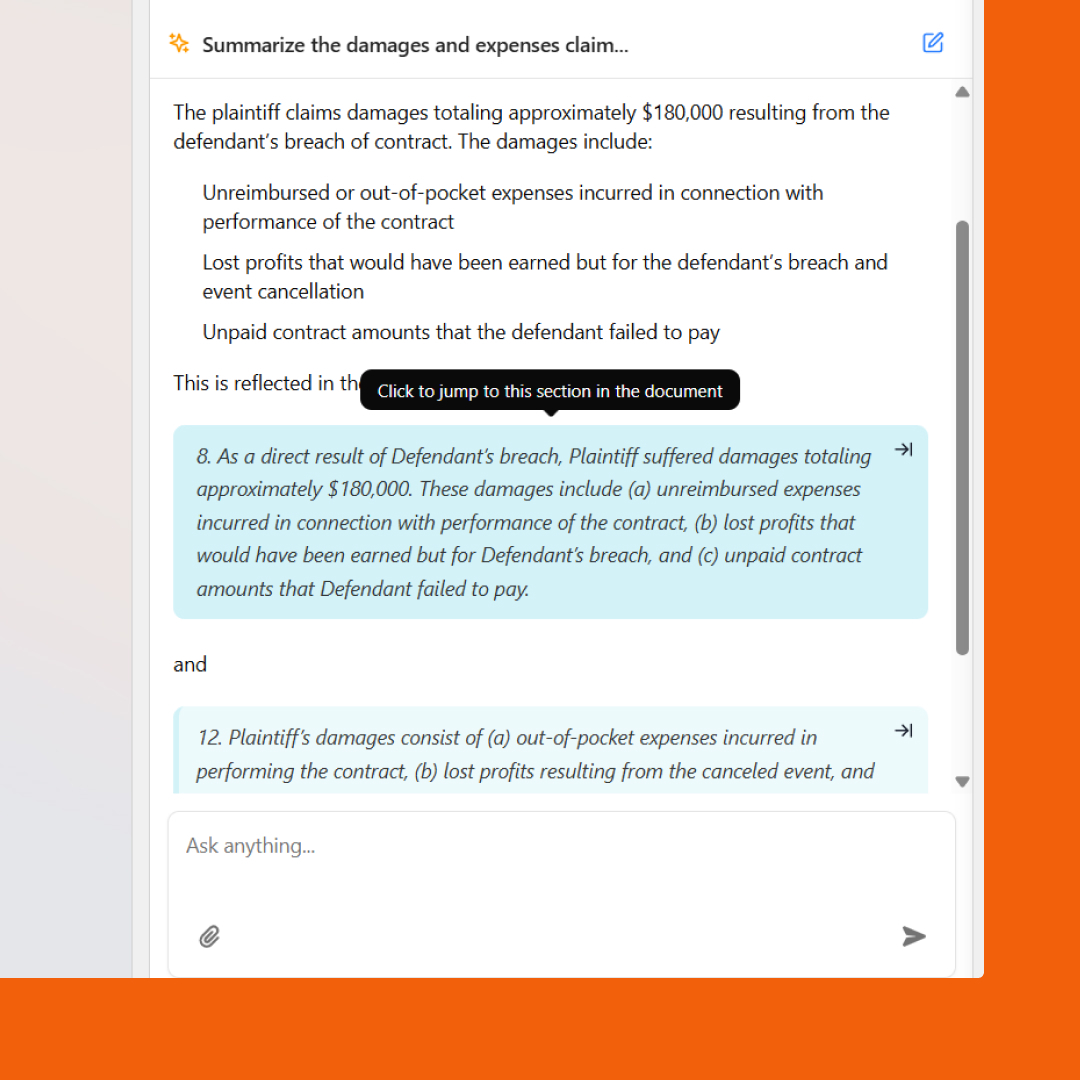
Archie AI for Word helps you stay in flow

Review every change with confidence

Legal professionals need control over every word that enters a document. That's why Archie AI applies edits as tracked changes within Microsoft Word.

Rather than automatically rewriting your document, Archie presents suggested edits for your review. You can accept, reject, or modify each recommendation, ensuring every change aligns with your professional judgment and firm standards.

You stay firmly in control of the final product.
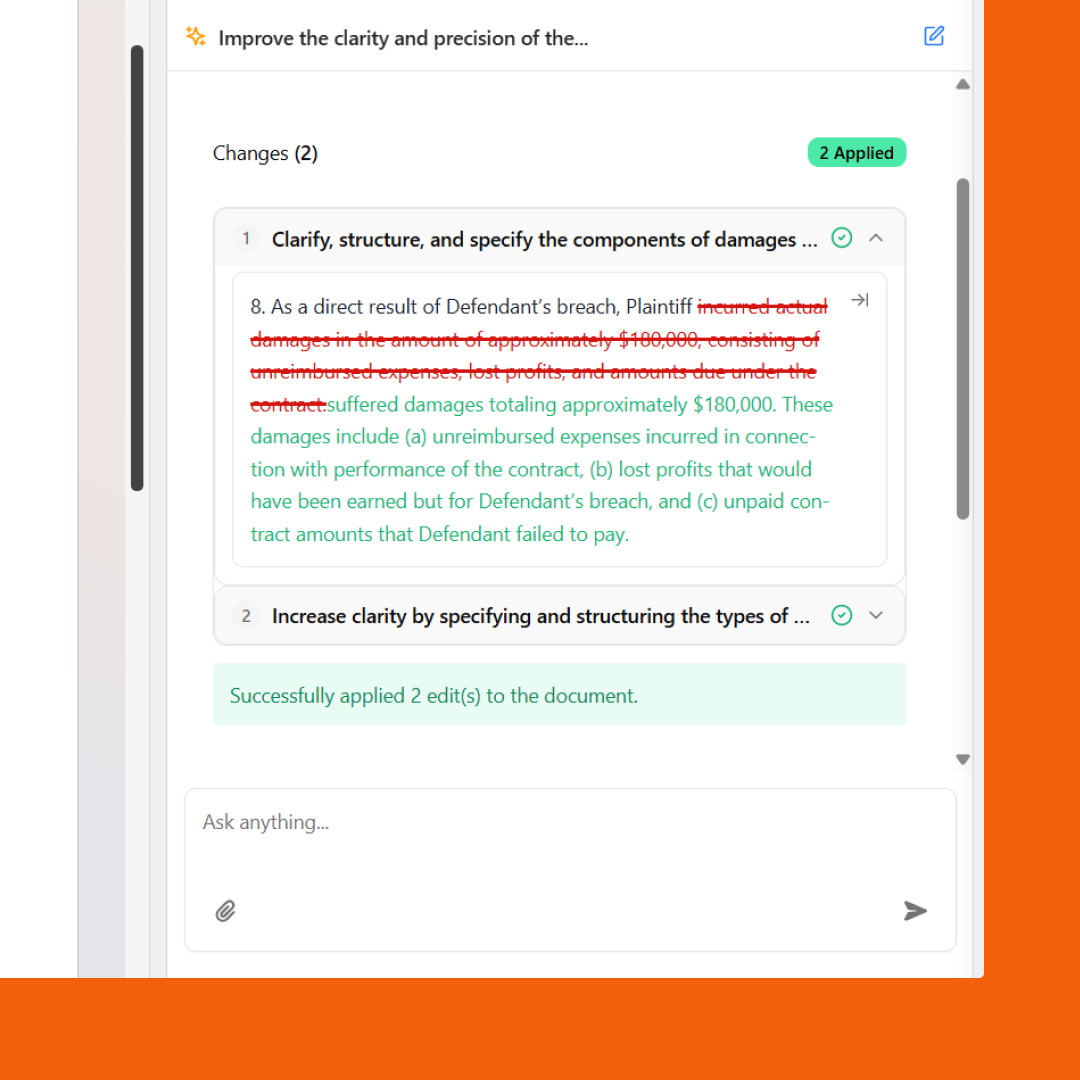
Archie AI applies edits as tracked changes within Microsoft Word

Refine documents without starting from scratch

Sometimes the hardest part isn't drafting, but improving what's already there. Archie AI surfaces intelligent suggestions to help strengthen your work, including:

  • Identifying gaps in your document
  • Highlighting areas that could be clarified or tightened
  • Extracting key insights from complex content
  • Suggesting next steps and follow-up actions

Instead of rereading an entire document searching for opportunities to improve it, Archie creates a clear path right into the work.

Choose the right AI model for the task

Different legal tasks require different types of reasoning.

With Archie AI for Word, you can choose from leading large language models, including GPT, Claude, and Gemini, without leaving Microsoft Word.

  • Need a quick draft of a client communication? Select a model optimized for speed.
  • Working through complex legal analysis or cross-document review? Choose a model designed for deeper reasoning and more sophisticated outputs.

You have the flexibility to select the right tool for the job while staying within a single, secure workflow.

Built on the security you already trust

Security remains at the core of everything we build. Archie AI operates within Smokeball's secure environment, meaning your firm's data is never shared with third parties for viewing, training, or AI model development.

See how your data stays safe

Experience Archie AI Where You Already Work

Archie AI for Word brings matter-aware legal drafting, intelligent editing, and powerful AI assistance directly into Microsoft Word.

No switching between applications. No generic AI outputs. Just smarter drafting, powered by your matter context and built into the workflow you use every day.

Ready to see Archie AI for Word in action?

➡️Try Archie for Word

👋 Hello! It looks like you're visiting from the US. Do you want to visit our American site?
👋 Hello! It looks like you're visiting from the UK. Do you want to visit our UK site?
👋 Hello! It looks like you're visiting from Australia. Do you want to visit our Australian site?
×

Archie AI for Word: AI-Powered Legal Drafting, Embedded Directly in Microsoft Word

Smokeball

Written by

Smokeball

|

June 22, 2026

Archie AI for Word: AI-Powered Legal Drafting, Embedded Directly in Microsoft Word

Archie AI for Work: Native to your workflow. Grounded in your matter.

Lawyers spend a significant portion of their day drafting, reviewing, and refining documents in Microsoft Word. That's why Smokeball has brought Archie AI directly into the place where legal work happens.

Archie AI for Word just got more powerful — your AI legal drafting assistant, embedded natively inside Microsoft Word and powered by the full context of your matter.

Instead of switching between applications, copying and pasting content, or relying on generic AI tools that lack legal context, Archie AI works alongside you in Word, helping you draft, edit, analyze, and refine documents without interrupting your workflow.

Bringing Archie AI to your Word Workflow

Draft with the context that matters

Most AI drafting tools only see the text that's currently in front of them, but Archie AI goes further. Because Archie AI is connected to your Smokeball matter, it draws from relevant files, correspondence, evidence, events, notes, and tasks to inform its responses.

That means more accurate drafts and suggestions, and less time spent manually providing background information or documents.

Whether you're preparing correspondence, drafting court documents, or refining legal arguments, Archie AI embedded in Word helps ensure your work is grounded in the information that matters.

Archie AI is connected to your Smokeball matter

Stay focused and maintain drafting momentum

Switching between applications breaks concentration and slows progress. Archie AI for Word helps you stay in flow by keeping drafting assistance exactly where you need it.

Need to rewrite a paragraph? Summarize a lengthy section? Generate a first draft of a client letter? Ask Archie AI directly from the sidebar and continue working without disrupting your momentum.

Archie AI for Word helps you stay in flow

Review every change with confidence

Legal professionals need control over every word that enters a document. That's why Archie AI applies edits as tracked changes within Microsoft Word.

Rather than automatically rewriting your document, Archie presents suggested edits for your review. You can accept, reject, or modify each recommendation, ensuring every change aligns with your professional judgment and firm standards.

You stay firmly in control of the final product.

Archie AI applies edits as tracked changes within Microsoft Word

Refine documents without starting from scratch

Sometimes the hardest part isn't drafting, but improving what's already there. Archie AI surfaces intelligent suggestions to help strengthen your work, including:

  • Identifying gaps in your document
  • Highlighting areas that could be clarified or tightened
  • Extracting key insights from complex content
  • Suggesting next steps and follow-up actions

Instead of rereading an entire document searching for opportunities to improve it, Archie creates a clear path right into the work.

Choose the right AI model for the task

Different legal tasks require different types of reasoning.

With Archie AI for Word, you can choose from leading large language models, including GPT, Claude, and Gemini, without leaving Microsoft Word.

  • Need a quick draft of a client communication? Select a model optimized for speed.
  • Working through complex legal analysis or cross-document review? Choose a model designed for deeper reasoning and more sophisticated outputs.

You have the flexibility to select the right tool for the job while staying within a single, secure workflow.

Built on the security you already trust

Security remains at the core of everything we build. Archie AI operates within Smokeball's secure environment, meaning your firm's data is never shared with third parties for viewing, training, or AI model development.

See how your data stays safe

Experience Archie AI Where You Already Work

Archie AI for Word brings matter-aware legal drafting, intelligent editing, and powerful AI assistance directly into Microsoft Word.

No switching between applications. No generic AI outputs. Just smarter drafting, powered by your matter context and built into the workflow you use every day.

Ready to see Archie AI for Word in action?

➡️Try Archie for Word

Related Product Content

Archie AI: Next Generation

The next generation of Archie AI has arrived

60 Tech Tips in 60 Minutes: The Rapid-Fire Tech Guide for Legal Professionals

60 Tech Tips in 60 Minutes: The Rapid-Fire Tech Guide for Legal Professionals

The Law Firm Guide to Changing Legal Software

The Law Firm Guide to Changing Legal Software

Book Your Free Demo

Ready to see how Smokeball client intake software helps you Run Your Best Firm? Schedule your free demo!

This field is required.

This field is required.

This field is required.

This field is required.

This field is required.

Your personal data will be kept confidential. By sharing your phone number, you agree to receive promotional messages and/or phone calls from Smokeball. Consent is not a condition of purchase. View our Privacy Policy and Terms of Service for more information.

Thank you! Your submission has been received!
Oops! Something went wrong while submitting the form.

More Smokeball Product Updates